
On this page
Short answer: There is no single best eSIM for everyone. The best one for China is a travel eSIM that you install before you fly, runs on a Chinese network (China Unicom and/or China Telecom), and sends your data outside mainland China. That last part is what lets Google, WhatsApp and Instagram work on mobile data. Choose by trip length, daily cap and refund policy, not by brand.
Before you start
- An eSIM phone, unlocked. A carrier-locked phone can’t use another provider’s eSIM. Apple notes that iPhones sold for mainland China generally do not support eSIM. See Apple’s eSIM support page.
- Wi-Fi at home. Check your provider’s install instructions. If it needs internet to install or activate, do it before you enter mainland China.
- A few minutes to read the plan page. That is where the real differences are.
What makes an eSIM “best” for China
Five things matter. Check them on the plan page, or ask the seller.
| Check | What to look for |
|---|---|
| Network | Names China Unicom, China Mobile and/or China Telecom |
| Routing | Says traffic goes outside mainland China. If the page doesn’t say, ask support |
| Daily cap | Many “unlimited” plans slow down after a daily limit. Read the fair-use line |
| Hotspot | Some plans restrict tethering, or don’t confirm it |
| Refund and top-up | A clear refund policy if it doesn’t connect, and top-ups in the app |
Why routing matters, and why it does nothing on hotel Wi-Fi, is explained in Do roaming eSIMs bypass the Great Firewall?
Which plan fits your trip?
| You are… | Look for |
|---|---|
| Short trip, maps and messages | A small data plan (a few GB) for the days you need |
| 1–2 weeks, normal use | A mid-size plan or a daily-cap plan covering your dates |
| Heavy use, video calls, hotspot | A high daily cap, and confirm hotspot is allowed |
| Need phone calls | Data eSIMs have no number. Check for voice, or keep home roaming |
| Also visiting Hong Kong or Macau | A plan that lists all three destinations |
As a price guide, Airalo’s China page currently lists China Unicom plans labelled unlimited at about $11.50 for 3 days, $27 for 7 days, $49 for 15 days and $69 for 30 days. Prices change, so check the plan page and its fair-use line.
For current price ranges and a longer comparison, see Best eSIM for China and eSIM for China. We don’t repeat them here.
Where to buy
Buy only from the provider’s official site or app.
- Airalo: official site airalo.com. The app is called Airalo; check the publisher in your app store. Airalo’s China eSIM (affiliate link, same price for you).
- Yesim: official site yesim.app. The app is called Yesim; start from the site’s download links and check the publisher. Yesim’s China eSIM (affiliate link, same price for you).
- Trip.com: official site www.trip.com. The app is Trip.com: Book Flights, Hotels (App Store). On Android, search the same name in Google Play and check the publisher.
- Others people use: Holafly, Nomad, Jetpac, Saily, Ubigi.
Step by step
- Check that your phone supports eSIM and is unlocked.
- Buy the plan on the provider’s official site or app, at home, on Wi-Fi.
- Install it before you enter mainland China. On iPhone: Settings > Cellular > Add eSIM, choose Use QR code on the Set Up Cellular screen, scan, wait for activation, then tap Continue. On Android, follow your provider’s own steps. In the Airalo app, the install screen walks you through it.
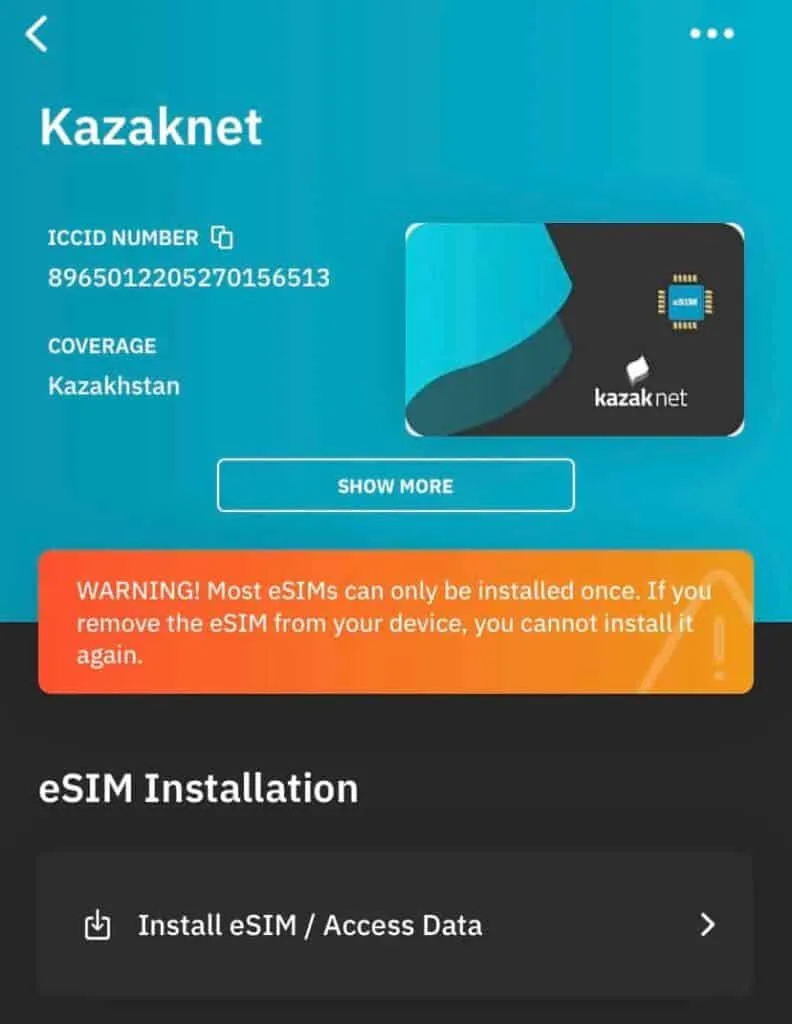
- When you land, turn on the eSIM line and make sure data roaming is on for it.
- Use the eSIM for mobile data. If you keep your home line on, turn off data roaming on it to avoid fees.
- Turn off Wi-Fi when you need blocked apps. Hotel and café Wi-Fi are Chinese networks, so an eSIM can’t change what you reach there. The list of blocked apps follows Freedom House, Freedom on the Net 2025: China. On iPhone, go to Settings > Cellular, tap Cellular Data and choose the eSIM line. Apple’s dual-SIM settings also include Allow Cellular Data Switching, which doesn’t work while data roaming is on. See Apple’s dual SIM page.
If it doesn’t work
| Problem | Why | Fix |
|---|---|---|
| Can’t download the eSIM in China | Some providers need a connection that works from abroad | Install at home on Wi-Fi next time. Check your provider’s instructions |
| Google or WhatsApp won’t load | You are on hotel or café Wi-Fi, or the plan doesn’t route abroad | Turn Wi-Fi off. Ask support if the plan routes outside mainland China |
| Data is very slow | You hit the daily cap | Check the fair-use line. Wait for the next 24-hour period or top up |
| No signal | Roaming is off or the wrong line is selected | Turn on the eSIM line and its data roaming |
FAQ
Do I need a VPN if I have a travel eSIM?
Not on mobile data, if your plan routes outside mainland China. On Wi-Fi, an eSIM does nothing. See our explainer.
Can I buy the eSIM after I land?
Check your provider’s instructions. Some can’t be downloaded inside mainland China, so buy and install before you fly.
Do I get a Chinese phone number?
The plans we looked at are data-only, with no number and no SMS. Check the plan page.
Still stuck?
Do it yourself with the steps above, or get help from a real person.
Sources: Apple eSIM support, Freedom House, Freedom on the Net 2025: China, Airalo help article on China access, Trip.com. Some links are affiliate links — see our disclosure.Free China trip checklist + visa rule alerts
We email you only when the rules for your passport change, plus a printable China trip checklist (PDF) right now. No spam, unsubscribe any time.
Almost done: check your inbox and tap the confirm link (look in spam if it isn't there).
Last updated
 WhatsApp: scan with your phone
 WeChat: scan, or save and open in WeChat