
Does Samsung Wallet Work with WeChat Pay in China? (2026)
Short answer: Only for Korean Samsung Wallet users, and only through Samsung Wallet Money. Samsung announced on 27 October 2026 that Korean Samsung Wallet users can pay at WeChat Pay merchants in mainland China using Samsung Wallet Money, a prepaid wallet. The announcement does not say that ordinary Samsung Wallet bank cards or users from other countries are supported. Availability and setup depend on the Samsung Wallet Money service. If you are not a Korean user, set up a backup such as Alipay.
Official source: Samsung Newsroom Korea announcement (in Korean).
What Samsung announced
Section titled “What Samsung announced”| Question | Status |
|---|---|
| Is there an official announcement? | Yes. Samsung announced it on 27 October 2026 (link above). |
| What changed? | Eligible Korean Samsung Wallet Money users can make QR payments at WeChat Pay merchants across mainland China. |
| For whom? | Korean Samsung Wallet users with Samsung Wallet Money. Users from other countries and ordinary Samsung Wallet bank cards are not mentioned as supported. |
| How do you pay? | Show the payment code in the app for the cashier to scan, or scan the shop’s own WeChat Pay QR code yourself. |
| Where does the money come from? | A Samsung Wallet Money balance, a prepaid wallet topped up in advance from a bank account (such as Woori Bank). |
| Credit cards? | Not yet supported for QR payments in China. Samsung plans to add them in the first quarter of 2027. |
| Fees? | No overseas payment fee for these payments. 0.3% of offline spending is returned as Samsung Wallet points, with no cap. |
| Which phones, from what time? | Check before you go. |
Before you start
Section titled “Before you start”- You are a Korean Samsung Wallet user with Samsung Wallet Money. If not, this feature is not confirmed for you. Use a backup below.
- A Samsung Wallet Money balance, topped up in advance from a bank account. Top up before you fly. Setup and top-up rules depend on the Samsung Wallet Money service: check before you go.
- Don’t plan on adding a Visa, Mastercard or other card to Samsung Wallet to use this feature. The announcement does not cover that.
- A backup that already works. Pick one:
- Alipay with a foreign card (our first choice for most trips).
- WeChat Pay.
- TenPayGo, Tencent’s app for WeChat Pay merchants, set up with an email.
Step by step: try it safely (Samsung Wallet Money, Korean users)
Section titled “Step by step: try it safely (Samsung Wallet Money, Korean users)”-
Set up your backup first. Follow one of the guides above, at home, before you fly.
-
Update Samsung Wallet from Google Play or the Galaxy Store.
-
Top up your Samsung Wallet Money balance from your bank account before you travel. Payments come out of this balance.
-
At the shop, look for the WeChat Pay sign. The sign shows the shop takes WeChat Pay, but it does not guarantee Samsung Wallet Money will work at that exact shop. Ask or have your backup ready.
-
Pay in one of two ways. Show the payment code in the app for the cashier to scan. Or scan the shop’s own WeChat Pay QR code yourself.
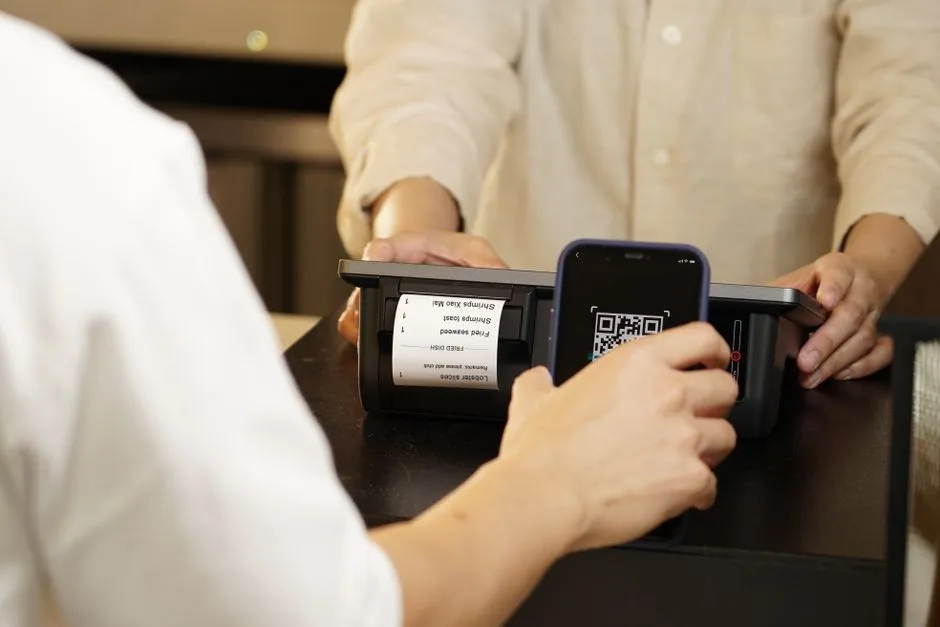 Showing a payment QR code for the cashier to scan.
 Small stands often show just one QR code, so keep a backup.
 -
Start with a small purchase, such as a bottle of water. There is no overseas payment fee for these payments, and 0.3% of offline spending comes back as Samsung Wallet points.
-
If it fails, pay with your backup. Don’t hold up the queue.
If it doesn’t work
Section titled “If it doesn’t work”| Problem | Why | Fix |
|---|---|---|
| No WeChat Pay option in Samsung Wallet | Feature is announced for Korean users with Samsung Wallet Money, so it may not be available in your country, phone model or app version | Update the app, then use your backup |
| Can’t pay with a credit card | Credit cards are not yet supported for QR payments in China (planned for Q1 2027) | Top up your Samsung Wallet Money balance from a bank account, or use your backup |
| Payment fails | Balance may be too low | Top up the balance, or use your backup |
| Shop doesn’t take it | The shop may not support this wallet even with a WeChat Pay sign | Show your Alipay or TenPayGo code instead |
Is this official?
Section titled “Is this official?”Yes. Samsung announced it on 27 October 2026. It covers Korean Samsung Wallet users paying with Samsung Wallet Money.
I’m not Korean. Can I use it?
Section titled “I’m not Korean. Can I use it?”The announcement does not say users from other countries are supported. Check before you go, and carry a backup.
Is there a fee?
Section titled “Is there a fee?”Samsung Wallet Money charges no overseas payment fee for these payments. Offline spending earns 0.3% back as Samsung Wallet points, with no cap. For comparison, Alipay and TenPayGo charge nothing up to ¥200 and 3% above that.
Can I use my credit card?
Section titled “Can I use my credit card?”Not yet for QR payments in China. Samsung plans to add credit cards in the first quarter of 2027.
Should I rely on Samsung Wallet in China?
Section titled “Should I rely on Samsung Wallet in China?”No. Carry a backup: Alipay or WeChat Pay set up at home, plus a second card. Some small vendors only show one kind of QR code.
Do I still need WeChat?
Section titled “Do I still need WeChat?”Not for paying if the feature works for you, but you may want it for messaging hotels or guides. See the WeChat Pay guide.
Does this replace Alipay?
Section titled “Does this replace Alipay?”We can’t say. Alipay’s foreign-card setup is well documented in our Alipay guide.
Still stuck?
Section titled “Still stuck?”Do it yourself with the steps above, or get help from a real person.
Sources: Samsung Newsroom Korea, 27 October 2026. Related facts from our Alipay, TenPayGo and WeChat Pay guides. Some links on this site are affiliate links — see our disclosure.Chat with Pablo
Real person, replies within 24h (usually faster). Paid help from $15; quick questions welcome.
Open WhatsApp chat WhatsApp: scan with your phone
 WeChat: scan, or save and open in WeChat
WeChat ID: qingapple1992