
TenPayGo: Pay with WeChat Pay in China Without WeChat (2026 Guide)
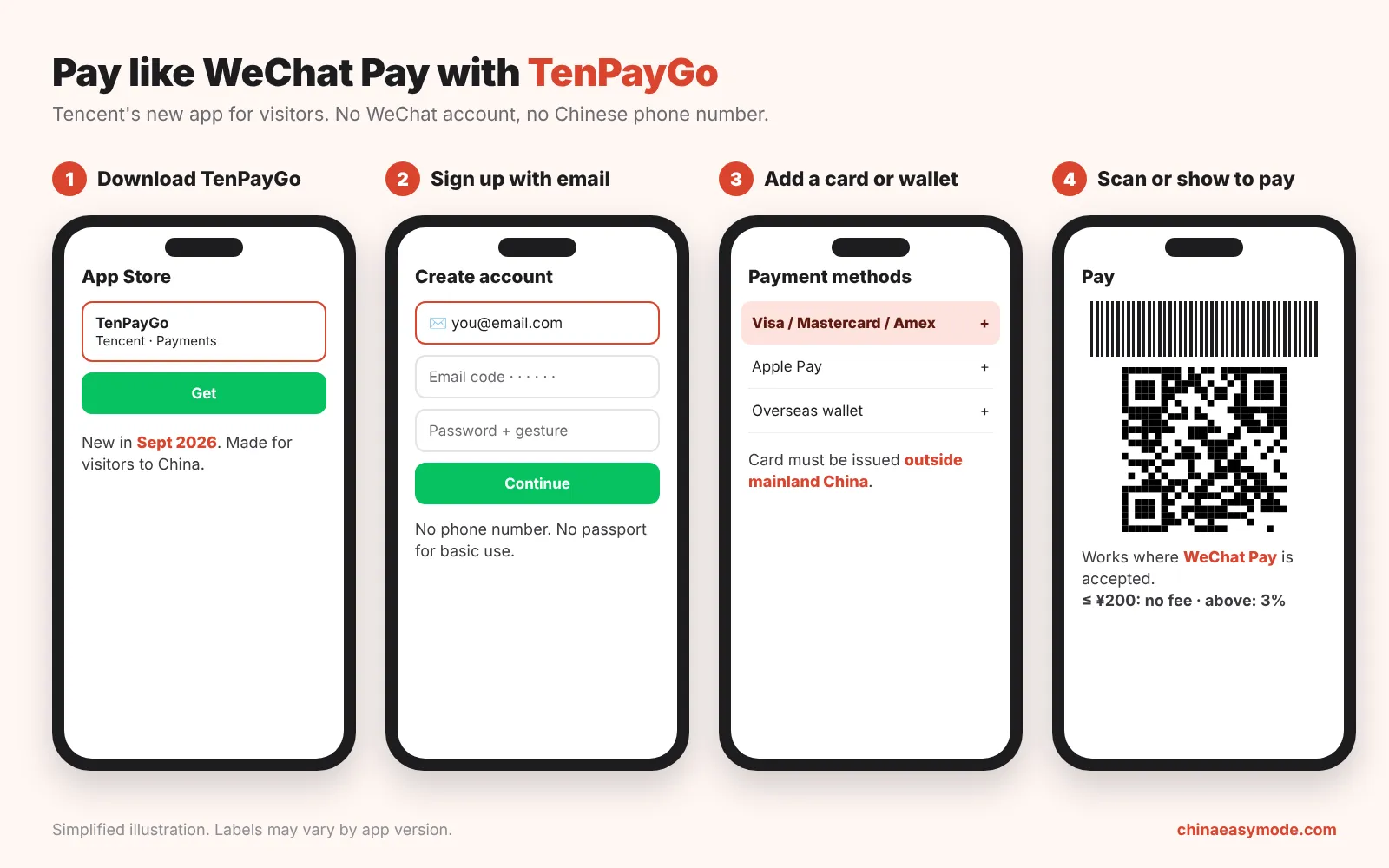
Short answer: TenPayGo is Tencent’s new payment app for overseas visitors. Sign up with your email (no phone number), add a foreign card or Apple Pay, then scan or show a QR code anywhere WeChat Pay is accepted. Payments of ¥200 or less are free.
TenPayGo comes from Tencent’s Weixin Pay and launched on 24 September 2026. It takes a Visa, Mastercard, Amex, JCB, Diners, Discover or UnionPay card, Apple Pay or a supported overseas wallet. Above ¥200, a 3% fee is shown before you confirm. The official site is tenpaygo.com.
TenPayGo vs WeChat vs Alipay
Section titled “TenPayGo vs WeChat vs Alipay”| TenPayGo | WeChat (Weixin) Pay | Alipay | |
|---|---|---|---|
| Sign up with | Phone number + passport verification | Phone number | |
| Pays at | WeChat Pay merchants | WeChat Pay merchants | Alipay merchants |
| Foreign cards | 7 networks + Apple Pay + overseas wallets | Visa, MC, Amex, JCB… | Visa, MC, Amex, JCB… |
| Chat, mini-programs | ❌ | ✅ | Mini-programs ✅ |
| Didi, metro QR codes | Shenzhen transit only (for now) | Via mini-programs | Built in |
| Best for | Fast setup, short trips | Chatting with hotels/guides too | All-round first choice |
Our take: set up Alipay first (it covers the most, including Didi and metro codes), and add TenPayGo as your WeChat Pay backup if you don’t want to set up WeChat. Some small vendors only show a WeChat Pay code, and TenPayGo pays those.
Step by step
Section titled “Step by step”-
Download TenPayGo from your App Store or Google Play. The app is called TenPayGo (developer: Tencent Technology (Shenzhen) Co., Ltd.). If search doesn’t find it in your country, use the store links on the official site, tenpaygo.com.
 TenPayGoApp StoreGoogle Play
 -
Sign up with your email: enter the verification code, set a password and a gesture pattern. No phone number or passport needed for basic use.
-
Add a payment method: a card issued outside mainland China, Apple Pay, or a supported overseas wallet (e.g. ShopeePay; about 60 wallets expected by end of 2026).
-
Pay: tap Scan to scan the shop’s QR code, or show your payment code for the cashier to scan. Check the amount and any fee, then confirm.
- ¥200 or less: no platform fee.
- Over ¥200: 3% service fee, shown on the confirmation screen before you pay.
- Your bank or wallet may add its own foreign-transaction fee.
Cut the exchange-rate cost: your bank’s conversion fee is often 1–3% on top. A multi-currency debit card such as Wise converts at the mid-market rate with a small, upfront fee, and many visitors link it to Alipay and WeChat Pay (referral link). Keep a second card as backup in case it’s declined.
What it can’t do
Section titled “What it can’t do”- No chatting, mini-programs or social features (that’s the WeChat app).
- No sending money to people, red packets or bill splitting.
- Can’t use Chinese bank cards, WeChat Pay balance or cash top-ups.
- Transit codes and tax refunds are Shenzhen-only at launch; more cities are planned.
Extras worth knowing
Section titled “Extras worth knowing”- “Translate with Driver”: live two-way translation (English, Korean, Spanish, Thai, French at launch).
- AI camera: explains landmarks and translates menus. Results are “for reference only”.
Do I still need WeChat?
Section titled “Do I still need WeChat?”Not for paying. You may still want WeChat to message hotels, guides or new friends. See our WeChat Pay guide.
Is TenPayGo official?
Section titled “Is TenPayGo official?”Yes. It’s published by Tencent (Weixin Pay’s parent). Download only from the official app stores or tenpaygo.com.
Will it work for Didi?
Section titled “Will it work for Didi?”Not directly at launch. Use Didi inside Alipay or the DiDi app.
Still stuck?
Section titled “Still stuck?”Follow the steps above, or get help from a real person.
Sources: official site tenpaygo.com; Weixin Pay launch announcement (24 Sep 2026) as reported by Southern/Newsgd (25 Sep 2026); hands-on details from China Neighbor (updated 13 Oct 2026) and Pay in China Guide. TenPayGo is brand new and features are rolling out, so check the app before you travel.Chat with Pablo
Real person, replies within 24h (usually faster). Paid help from $15; quick questions welcome.
Open WhatsApp chat WhatsApp: scan with your phone
 WeChat: scan, or save and open in WeChat
WeChat ID: qingapple1992